


CookieRun: OvenSmash
4.11.86K Reviews
App Specs
- Version
- Varies with Device
- Updated On
- License
- Free
- Downloads
- 1,000,000+
- Developer
- Devsisters Corporation
- Categories
- Action
- Platform
- Android
Screenshots
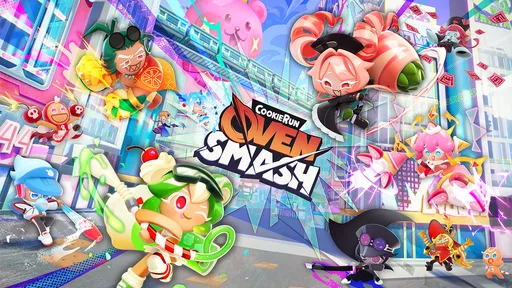






 Analysis by AppCompare
I approached CookieRun: OvenSmash as the sort of action game that might end up on a shared phone or tablet, not just as something played alone in a quiet room. That changed what I paid attention to. A quick match can be easy to hand over to someone else, but shared devices also raise practical questions about accounts, purchases, progress, and whether the game feels suitable for different people in the same household.
My overall impression is positive, with an important condition: this is best treated as a lively, pick-up-and-play action game rather than a calm, universally suitable family activity. Devsisters Corporation has built the game around immediate energy and a playful CookieRun identity. The store summary, “Let's Smash it up!”, captures that direct attitude, while the short description keeps things simple with the name CookieRun: OvenSmash.
It is free to start, carries an Everyone age rating, and supports devices running Android 8.0 or later. That makes it approachable for many households, although free installation does not mean every part of the experience is cost-free. In-app purchases range from $0.99 to $99.99 per item, so I would set expectations before letting a child or guest use a device connected to a payment method.
How it works when a shared device is part of the plan
I find a shared device works best when everyone knows whether they are taking turns in one person’s game or simply trying it out. Before handing it over, I’d make sure the account owner is nearby for any purchase decision and agree on a clear stopping point, such as the end of the current attempt. That keeps the handoff easy and leads naturally to the question of how to protect each player’s time and expectations.
A good fit for short turns and casual handoffs
The strongest household use case is a phone or tablet that several people occasionally pick up. One person can play for a while, pass the device across the sofa, and let another person try without needing the game to become the center of the evening. Its action focus makes the appeal obvious quickly: you do not need a long explanation before someone understands that the point is to jump into the chaos and smash things up.
That immediacy is useful when players have different levels of experience. A regular player can enjoy improving technique, while a newcomer can still understand the basic attraction without first studying a complicated role system. I would use it as a short break after school, during a commute, or while waiting for dinner rather than promising a structured group activity that requires everyone to stay involved.
There is also a trade-off in that convenience. Fast action can encourage “one more try” behavior, especially when a player feels close to doing better. On a shared device, that can turn a planned ten-minute turn into a longer session. I found it helpful to agree on a simple handoff rule before starting: finish the current attempt, then pass the device. That keeps the game from becoming an argument about whose turn it is.
Worth Reading Before You Choose

EA SPORTS FC Mobile 26 Is a Bigger Football Game, but It Takes Time

Flipboard Shows What News Apps Must Do Beyond the Feed

Switching to Android Auto Means Rethinking Your Driving Routine

Google Calendar Makes a Crowded Week Easier to Manage

Ludo King Makes the Most of the Minutes Between Plans

Baby Panda World Brings Quick Play to Modern Phones, but Its Game Library Feels Busy
What I would check before installing it on a family tablet
The first practical question is not whether the game is free; it is who will be using the device and what account is active. I would install it under the household member who is expected to manage the game, then check the store account and payment settings before handing the tablet to anyone else. The purchase range is wide enough that casual tapping should not be treated as harmless just because the initial download costs nothing.
I would also decide whose progress matters. If several people share one profile, their play can become mixed together, and a younger player may change the experience that an older player was building. If the game or device offers separate account handling, use it deliberately; if not, make the boundary clear in conversation. I would not assume that a shared installation automatically creates separate progress, separate preferences, or separate purchase history.
This is one of the less obvious parts of reviewing a game for a household: the technical setup is only half the boundary. The other half is agreeing on ownership. Is this “our” game, one person’s game on a common tablet, or a temporary guest activity? Deciding that before the first session prevents disappointment later, particularly when a player becomes attached to progress or expects exclusive access.
Coordination matters more than the action label suggests
Although CookieRun: OvenSmash sits in the action category, shared use still benefits from coordination. I would keep the device in a visible common area if several people are meant to take turns. That makes it easier to notice when someone is waiting and reduces the chance that a player quietly continues far beyond the agreed time.
A useful routine is to let the least experienced player try first, then allow a more practiced player to demonstrate a technique without taking over. That approach makes the game feel like something being explored together instead of a competition where the strongest player controls the device. It also helps reveal whether the game’s pace suits the person using it. Some players enjoy the pressure; others may prefer a slower puzzle or strategy game.
For a household with siblings or friends sharing one screen, I would avoid using purchases or progress as the reward for winning a turn. That creates unnecessary tension and makes the game’s optional spending more emotionally charged. Keep the session about play, and handle any purchase decision separately with the account owner present.
Age rating is useful, but it is not a complete household guide
The Everyone rating makes the game easier to consider for a broad audience, and the colorful CookieRun presentation is naturally more approachable than a grim or realistic action title. Still, an age label does not tell me whether every child will enjoy the pace, understand spending boundaries, or stop easily after a session.
For younger players, I would explain that free access and optional purchases are different things. I would also watch the first session rather than handing over the device and assuming the rating answers every question. The important issue is not only content; it is whether the child can follow the household rule about turns and ask before interacting with anything that could charge the account.
Older children and adults may appreciate the more competitive side of an action game, but they may also be more likely to chase improvement. That is where trust matters. I would give independent access only when the player understands the device’s account boundary and the family’s spending rule. If that sounds too complicated for the intended user, a simpler offline game may be the better shared choice.
What makes the action appealing in practice
The game’s main strength is its immediate personality. CookieRun already suggests a bright, character-driven world, and OvenSmash turns that identity toward action rather than a quiet matching or decorating activity. When I want something with more movement and urgency than a standard casual game, this is the kind of change of pace I look for.
Compared with a traditional puzzle game, it asks more from reflexes and attention. Compared with a deep action title, it is easier to present to someone who does not normally play games, because the premise is not buried under a long explanation. That middle position is valuable in a household where one person wants excitement and another does not want a demanding console-style commitment.
It is not the right alternative for every mood. If I am looking for a relaxing activity, a turn-based game or a gentle puzzle would be less tiring. If I want a serious competitive experience with a highly organized team structure, I would choose a game designed specifically around that purpose. OvenSmash works best when the goal is energetic, accessible action in manageable sessions.
Three habits that improve the shared experience
- Separate play decisions from purchase decisions. I would never let a player decide about an in-app item while another person is waiting for the device. Pause, discuss it with the account owner, and only then continue.
- Use a visible turn boundary. Passing the device after the current attempt is clearer than relying on an undefined amount of time. It also gives new players a fair chance to learn without feeling rushed.
- Protect the owner’s progress. Before a guest starts, confirm which account and profile are active. Shared hardware does not automatically mean shared progress, and accidental changes can be more frustrating than losing a single turn.
These habits are not flashy features, but they make a real difference. They address the friction that store pages rarely explain: the game may be easy to launch, while the household arrangement around it requires a little planning.
Performance expectations and device choice
The minimum operating system requirement is Android 8.0, so the game is not limited to only the newest Android devices. Even so, I would choose the strongest suitable device available in a shared household rather than installing it on an old phone simply because the system version qualifies. Action games are more enjoyable when controls respond consistently, and a device that struggles can make a player blame themselves for problems caused by hardware.
A tablet can make handoffs more comfortable, while a phone is more convenient for personal, short sessions. The better choice depends on who is playing. For children sharing a family tablet, the larger screen may make observation and coordination easier. For an adult playing alone during spare moments, a phone is more natural. I would also remember that several people may want the device for other tasks, so the most convenient screen is not always the fairest one.
The game has reached more than a million installs, which suggests that it is not an obscure experiment with no audience around it. Its average rating is 4.1 from roughly fifteen thousand ratings, with about 1.9 thousand written reviews. I read that as a reasonably encouraging signal rather than a guarantee: enough people have tried it to form a useful general impression, but individual enjoyment will still depend heavily on tolerance for fast action and optional spending.
Who should play it, and who should look elsewhere
I would recommend it to someone who wants a colorful action game that can be understood quickly, especially if that person enjoys the CookieRun style and likes improving through repeated attempts. It is also a sensible candidate for a shared device when the household is comfortable with turn-taking and has a clear rule around purchases.
I would be more cautious for a player who dislikes pressure, becomes frustrated by repeated failure, or wants a slow game that can be played while only half-paying attention. I would also skip it as the main household game if the family needs firmly separated profiles, carefully managed access, or a completely purchase-free environment. In that situation, the problem is not necessarily the action itself; it is the mismatch between the game and the household’s boundaries.
Parents should treat the Everyone rating as a starting point for judgment, not a substitute for supervision during the first few sessions. Adults sharing a device should do the same for one another. A family member may be comfortable with action but not with spending prompts, while another may be happy to play casually but dislike having their progress altered. Those differences are easier to handle when discussed before the game becomes popular in the home.
My household verdict
After looking at it through the shared-device lens, I see CookieRun: OvenSmash as a lively free action game with a clear place in a household rotation. It is easiest to recommend when people want short, energetic turns and are willing to manage account ownership and purchases consciously. The game’s approachable presentation helps, but the practical rules around the device matter just as much as the gameplay.
Devsisters Corporation has positioned this release as a direct, action-focused CookieRun experience rather than a quiet side activity. That gives it a useful identity, especially beside slower casual alternatives. At the same time, the action pace and optional spending mean I would not install it blindly on a child-accessible device and assume the Everyone rating handles every concern.
For me, the final decision is simple: install it when the household wants colorful action, can agree on turns, and keeps purchase choices with the account owner. Choose something calmer or more tightly separated when those conditions are not present. With those boundaries in place, the game is easy to try because it is free, supports Android 8.0 and later, and has enough existing player interest to make the experiment feel worthwhile.
My recommendation: give it a try for shared casual play, but establish the account and spending rules first. That small step lets the fun part stay fun and prevents the most avoidable household friction from becoming the real story.
Pros
- Fast-paced matches are easy to learn but offer room to master.
- Bright character designs and lively animations make every run engaging.
- Short sessions fit well into quick breaks or mobile play.
- A varied roster encourages experimenting with different playstyles.
- Regular rewards help maintain progress without requiring constant purchases.
Cons
- Matchmaking quality may vary depending on your region and player activity.
- Some characters or upgrades can feel stronger than others.
- Frequent effects and movement may become visually overwhelming.
- Progress can slow noticeably once early rewards are exhausted.
- The game may consume considerable battery during longer play sessions.
FAQs for CookieRun: OvenSmash
What is CookieRun: OvenSmash?
CookieRun: OvenSmash is a multiplayer action game set in the colorful CookieRun universe. Players control Cookie characters in fast-paced battles, using unique skills, movement abilities, and team strategies to defeat opponents. The game is designed around competitive matches, so it is more focused on real-time action and cooperation than on the traditional endless-running style associated with some other CookieRun titles.
Is CookieRun: OvenSmash free to download and play?
CookieRun: OvenSmash is expected to follow a free-to-play model, allowing players to download the game without paying an upfront purchase price. However, free access does not necessarily mean that every item is unlocked. Games in this genre commonly include optional in-app purchases for cosmetics, progression boosts, characters, or other content. Before downloading, check the store listing and regional availability for the latest monetization details.
Does CookieRun: OvenSmash require an internet connection?
Yes, players should expect CookieRun: OvenSmash to require a stable internet connection for most or all of its main features. Because the game centers on online multiplayer battles, matchmaking, account synchronization, events, and competitive progression, it is not intended to be a fully offline experience. Playing over Wi-Fi or a reliable mobile connection is recommended to reduce lag, disconnections, and possible penalties during matches.
Can I play CookieRun: OvenSmash with friends?
The game is built around multiplayer competition, so playing with or against other people is one of its main attractions. Depending on the available version and features, players may be able to invite friends, join teams, participate in matchmaking, or compete in organized modes. Social options can change during testing and updates, so it is worth checking the in-game menus and official announcements for current party and friend functionality.
What devices are compatible with CookieRun: OvenSmash?
Compatibility depends on the final release version, operating system, device hardware, and the country where the game is offered. Since CookieRun: OvenSmash features real-time 3D action, older phones or tablets may experience reduced performance, longer loading times, or unsupported installation. Before downloading, review the official Google Play or App Store requirements, keep sufficient storage available, and install system updates when necessary.


